
Legal documents rarely stay in one place for long. A file may be drafted by an attorney, reviewed by a partner, printed for deposition preparation, scanned into a case management system, and shared with support staff. All this is done within a few hours. Throughout that journey, every printer, multifunction device, and print queue becomes part of the chain of custody.
This makes robust print security for law firms matter. Law firms have invested heavily in protecting email, cloud storage, and network access, yet printed information often moves through workflows with far less oversight. The result is unnecessary exposure of sensitive client information, privileged communications, and case-related documents that require the same level of protection as any digital asset.
Where Print-Related Data Security Risks Typically Emerge
Most print-related incidents are not caused by sophisticated attacks. They are usually the result of weak controls around everyday workflows.
Common risks include:
- Documents left unattended on output trays
- Shared devices with unrestricted access
- Unsecured print queues
- Outdated device firmware
- Lack of user authentication
- Limited visibility into print activity
These vulnerabilities directly affect legal document security because confidential information frequently passes through shared office equipment.
Many firms focus on network security while overlooking printers as connected endpoints. Yet modern multifunction devices store data, connect to networks, and process sensitive information every day. Without proper controls, they can become one of the least protected parts of the document lifecycle.
The Daily Legal Printing Reality of Client Confidentiality and Document Handling
Law firms process a remarkable range of sensitive information.
Examples include:
- Litigation files
- Discovery materials
- Merger and acquisition documents
- Employment records
- Financial disclosures
- Client correspondence
Many of these documents still require physical printing for review, collaboration, court preparation, or compliance purposes.
The challenge is not just in securing the documents themselves. Maintaining security while preserving efficiency is more difficult. Attorneys and support staff need quick access to information, but firms also need safeguards that prevent accidental exposure.
This balance is why law firm printer security solutions have become an important part of broader risk-management strategies.
New Security Challenges in Modern Legal Workplaces
Hybrid work has complicated print security significantly. Documents are no longer moving through a single office location. Legal teams often work across branch offices, client sites, courtrooms, and remote environments. This creates more devices, more workflows, and more opportunities for inconsistent security practices.
Firms evaluating how to manage office printers in law firms often discover that visibility is the real challenge. Without centralized oversight, it becomes difficult to know:
- Who printed a document
- When it was printed
- Which device was used
- Whether security policies were followed
At the same time, concerns around legal data protection continue to increase. Clients expect stronger safeguards, while firms face growing pressure to demonstrate responsible information handling practices.
Building a More Secure Legal Document Printing Environment
The strongest security strategies combine technology with policy. Effective secure printing solutions for law firms typically include:
- User authentication before document release
- Encrypted print and scan transmission
- Device access controls
- Secure cloud-connected workflows
- Centralized policy management
- Activity tracking and reporting
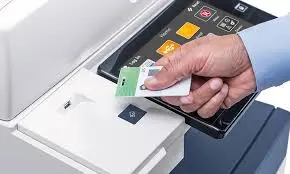
One particularly effective control is secure print release. Documents remain held until authorized users authenticate directly at the device. This simple step significantly reduces the risk of confidential information being viewed by unauthorized individuals.
Modern secure multifunction printers also support advanced security capabilities that extend beyond printing, helping firms create safer scanning, routing, and document management workflows.
Practical Security Habits Every Law Office Should Adopt
Technology alone is not enough. Some of the most effective printer security best practices include:
- Restricting administrative access
- Updating device firmware regularly
- Establishing document retention policies
- Reviewing user permissions periodically
- Training staff on secure document handling
- Monitoring device activity and exceptions
These practices help firms create more consistent security standards across offices and departments.
When combined with structured print management for law firms, they also improve accountability and reduce operational blind spots that can otherwise go unnoticed.
How Managed Services Strengthen Document Security
Managing security across multiple devices and locations can quickly become difficult for internal teams. Here, Xerox® managed print services for legal environments provide value. Centralized oversight makes it easier to apply consistent policies, monitor device health, manage security updates, and track document activity across the organization.
Organizations using managed services often gain:
- Greater visibility into print activity
- Improved policy enforcement
- Reduced administrative burden
- Better control over device security
- Stronger audit readiness
- Protection against data breaches
Rather than treating printers as isolated pieces of equipment, firms can manage them as part of a broader document security strategy.
Why Xerox Security Features Fit Legal Workflows
Modern Xeroxsup>® print security for law firms is designed around protecting information throughout its lifecycle.
Xeroxsup>® security capabilities include:
- User authentication controls
- Data encryption
- Secure print release
- Audit reporting
- Device hardening features
- Automated security updates
These capabilities help support both operational efficiency and security objectives without creating unnecessary friction for legal teams.
For firms evaluating stronger secure printing solutions, integrating modern Xeroxsup>® technologies with broader document workflows can help create a more resilient environment that helps protect sensitive data.
For additional guidance on securing print environments, explore Flynn’s Print Security solutions.
How to Assess Your Firm’s Current Readiness
A simple starting point is asking a few practical questions:
- Can you identify who printed sensitive documents yesterday?
- Are documents released only to authorized users?
- Are device security settings standardized?
- Is print activity monitored centrally?
- Are firmware and security updates managed consistently?
If the answer to several of these questions is no, there may be opportunities to strengthen both security and operational oversight.
FAQs:
Why is print security important for law firms?
Law firms routinely handle privileged, confidential, and highly sensitive information. Strong print security helps prevent unauthorized access, accidental disclosure, and document-handling inconsistencies that could create legal or reputational risks.
What are the biggest printer security risks in legal offices?
The most common risks include unsecured print queues, unattended documents, weak access controls, outdated firmware, and limited visibility into device activity.
How does secure print release protect confidential documents?
Secure print release requires users to authenticate at the device before documents are printed. This prevents sensitive materials from sitting unattended or being viewed by unauthorized individuals.
Can managed print services improve legal compliance?
Yes. Managed services help firms enforce consistent policies, maintain device security, monitor activity, and improve document accountability across multiple locations.
What features should law firms look for in secure printers?
Look for authentication controls, encryption, secure print release, audit logging, centralized management, and advanced security capabilities designed for connected document workflows.



Cảm ơn thông tin bổ ích. Nếu bạn quan tâm du học Hàn Quốc, Letco chuyên tư vấn lộ trình, chọn trường và xin visa với tỷ lệ đậu cao. Xem chi tiết tại letco.vn.
[302105]supplies professional anti-violence equipments and solutions for the whole world with strong and perfect production capacity. anti-violence.org
[472926]supplies professional anti-violence equipments and solutions for the whole world with strong and perfect production capacity. anti-violence.org
Really helpful, thank you — much appreciated. It’s relevant to the topic here. I’ve just been using a job board at https://jngs.app-zh-qygsports.com/ that honestly made the whole search easier. You can narrow roles down by industry and title, and fresh openings show up constantly.
Spot on, honestly. For job seekers, the thing that helped me most was ditching the scattergun approach — I landed on https://habw.seekridge.shop/. It lists local and remote roles with updates every day. Just my two cents!
[536313]supplies professional anti-violence equipments and solutions for the whole world with strong and perfect production capacity. anti-violence.org
Great read, thanks for sharing. Found something related over at seekroster.shop that adds useful context.